 KeniPoyo
Hi! I’m KeniPoyo, the only person in Japan playing Hytale. Today this post is for the people who make Hytale mods.
Here at Hytale Life we make a fan-made Japanese language mod for Hytale. Japanese players install it, switch the game language to Japanese, and play. Starting with our next update, it also translates popular community mods. So here is my question for you:
Would you like Japanese players to enjoy your mod in Japanese?
We’ll do the translation for free, and you don’t have to change anything. Let me explain how it works.
TL;DR
- We translate your mod’s text into Japanese and ship it inside our Japanese language mod
- Players who have our mod installed see your mod in Japanese automatically
- You don’t need to add files, update your mod, or do any extra work
- All we need is for your text to live in .lang files
- We only ship text. Your mod, your assets, and your downloads stay yours
It already works
One of the first mods we support is Japanese Things by SORASABI, and more are on the way. Here is what it looks like in game with our Japanese mod installed.
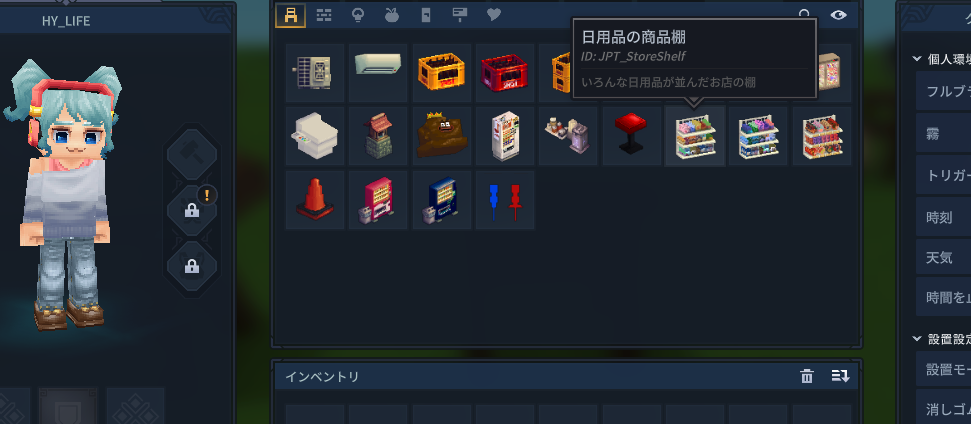
We didn’t touch a single file of the mod. Players just install the mod as usual, and the Japanese text comes from our language pack.
How it works
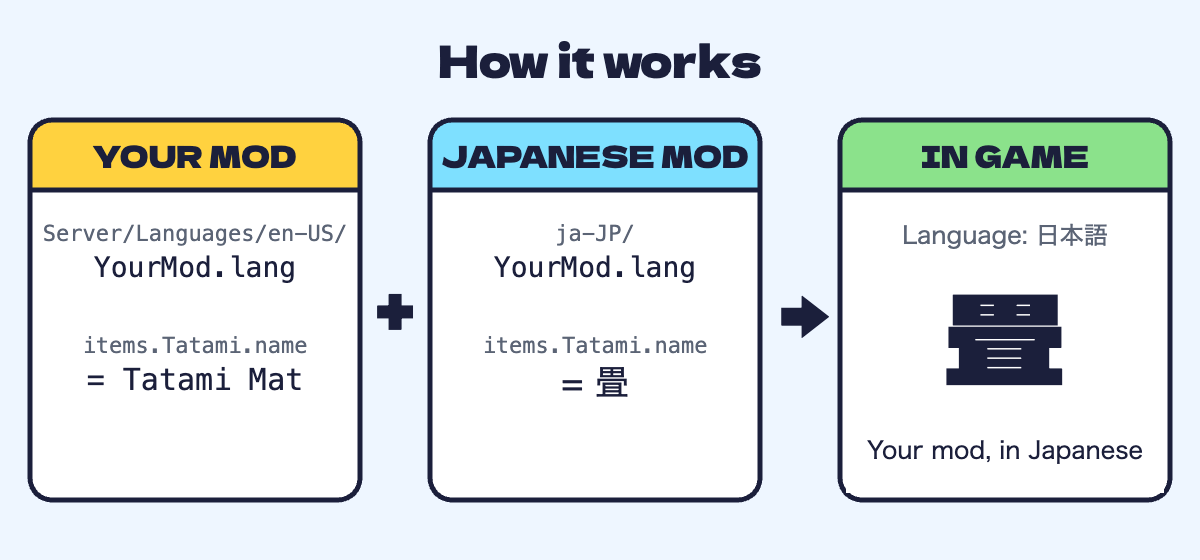
Hytale looks up text by key. Your mod’s English text lives in a file like this:
Server/Languages/en-US/YourMod.lang

items.Tatami.name = Tatami Mat
items.Tatami.description = Traditional tatami flooring
When the game language is set to Japanese, Hytale looks for the same keys in a Japanese file with the same file name. Our language mod includes that file:
ja-JP/YourMod.lang

items.Tatami.name = 畳
items.Tatami.description = 昔ながらの畳の床
That’s it. The keys stay exactly the same, only the text after the = changes. Color tags, line breaks, and placeholders like {key} are kept as they are.
What makes a mod easy to translate
Good news: if you followed the usual Hytale way of making mods, you’re probably already there. Here is a quick checklist.
- Item names and descriptions written in
Server/Languages/en-US/*.lang - Item JSON that points to a key, like
"TranslationProperties": {"Name": "server.items.MyItem.name"} - Category names, bench tabs, NPC names, and UI text that also use keys
- Plugin messages that use translation keys instead of fixed strings
- Keys that stay the same between updates
- Text written directly inside Java code
- Text written directly inside
.uifiles - Words baked into textures or images
A tip from our side: when you update your mod, try to add new keys instead of renaming old ones. When we update a translation, we compare your new English files with the previous version and only translate what changed. Stable keys mean the Japanese version catches up faster.
What we do and don’t do
- We translate your .lang text only and include it in our free Japanese language mod
- We never redistribute your mod, models, textures, or code. Players still download your mod from your page
- We credit you and your mod in our README and on our site
- When you update, we add the new lines on our side
- If you’d rather we don’t include your mod, just tell us and we’ll remove it. No hard feelings!
Want your mod in Japanese?
Leave a comment on this post or send us a message on X. Tell us your mod’s name and where to download it, and we’ll take a look. You can also just tell us it’s okay to translate, and we’ll take care of the rest.
Japanese players love trying new mods, but a lot of them give up when everything is in English. A little bit of Japanese can open your mod up to a whole new group of players.
Thanks for reading, and thanks for making Hytale more fun for all of us. Sayonara, Sayonara, Sayonara